
Reuse property details across your guides
Insert a variable for a property detail like check-in time or Wi-Fi so shared content always shows the right guide's own facts.
Updated
When you share a section across several guides, most of the wording is identical — but a detail like check-in time or the Wi-Fi password is not. A variable lets you write the sentence once and have each guide automatically show its own value.
Why this matters
Write "Check-in is from 3:00 pm" directly into a shared section, and every guide using it shows 3:00 pm — even a property whose check-in is actually 4:00 pm. Insert the check-in time as a variable instead, and each guide fills in its own answer.
You only need this for content you share across guides through a content library. A section written for one guide only can just use the real details directly, with no variable involved.
Inserting a variable
While writing a section, choose Variable in the editor toolbar and pick the detail you want from the list, grouped by what it describes:
- Property — guide name, and the full address or its individual parts (street, city, region, postcode, country)
- Stay — check-in time, check-out time
- Host — host name, phone number, WhatsApp number, email address
- Wi-Fi — network name, password
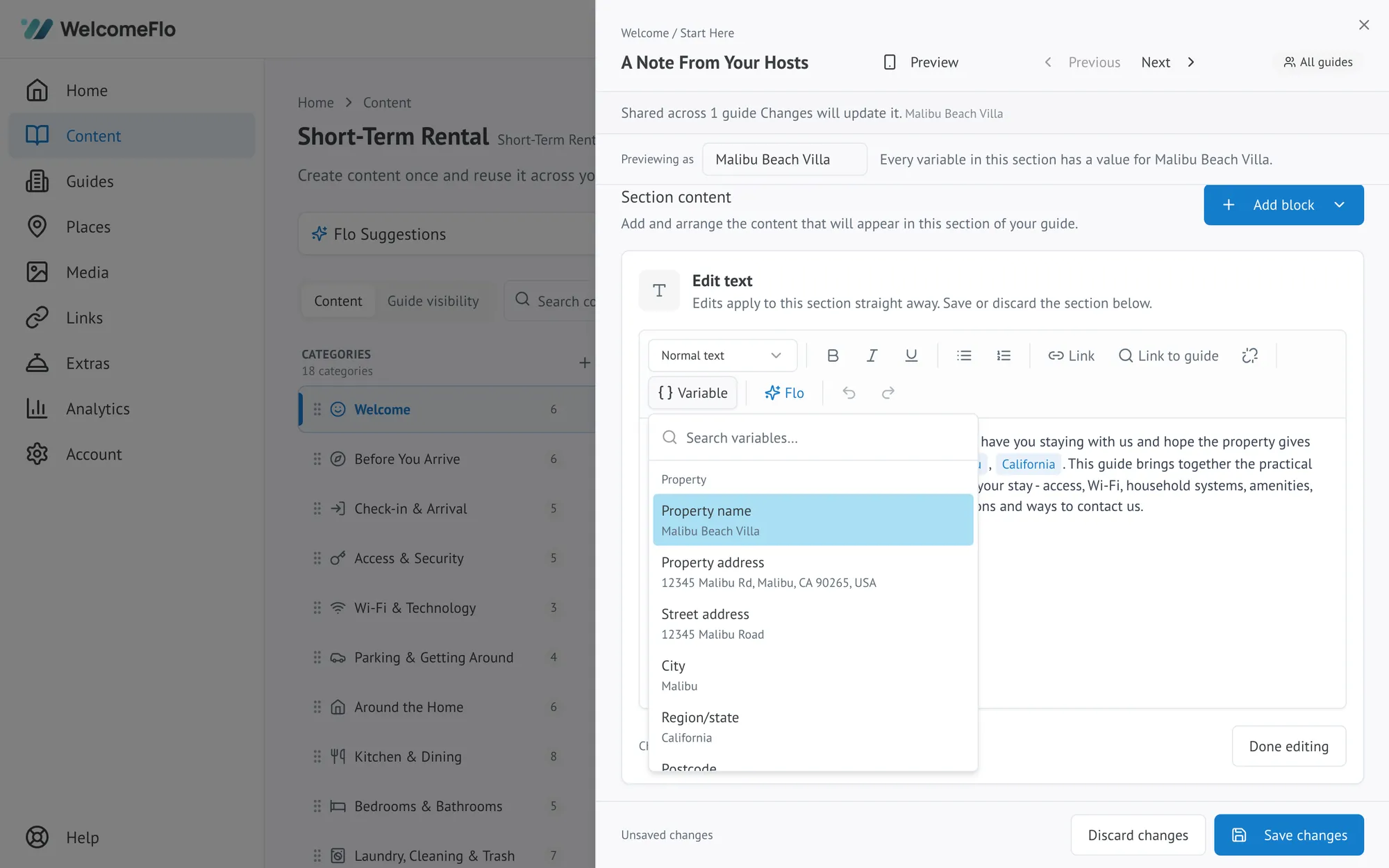
It is inserted as a labelled chip, such as "Property name" — never as text you type by hand.
How it behaves for each guide
The chip is a placeholder, not fixed text. Every guide using that shared section reads its own value in place of the chip, and guests only ever see the finished sentence — never the chip itself. If a guide has not had that detail filled in yet, the chip flags this to you while you are writing, so a gap is caught before a guest ever sees one.
Updating the value
A variable always reflects whatever is currently set in that guide's own settings — its property details, host contact details, or Wi-Fi details. To change what a guest sees, update the detail on the guide itself, the same way you would for any other guide (see Guide settings explained). You never edit the variable inside the shared section — that would change it for every guide using it, which is rarely what you want.
What a variable cannot do
A variable only ever stands in for one specific detail from the list above — never a whole sentence or paragraph. Write the sentence around it yourself, so the tone stays yours: "call or text" followed by the host name and host phone chips reads as an ordinary sentence, and you can rewrite the words around the chips any time.
