
Understand Flo Insights
How Flo Insights turns guest activity into specific suggestions, and what it looks at to find them.
Updated
Flo Insights looks at how guests actually use your guide and turns that into a short list of specific suggestions, rather than leaving you to read through raw numbers and guess what they mean. It lives on the Analytics page.
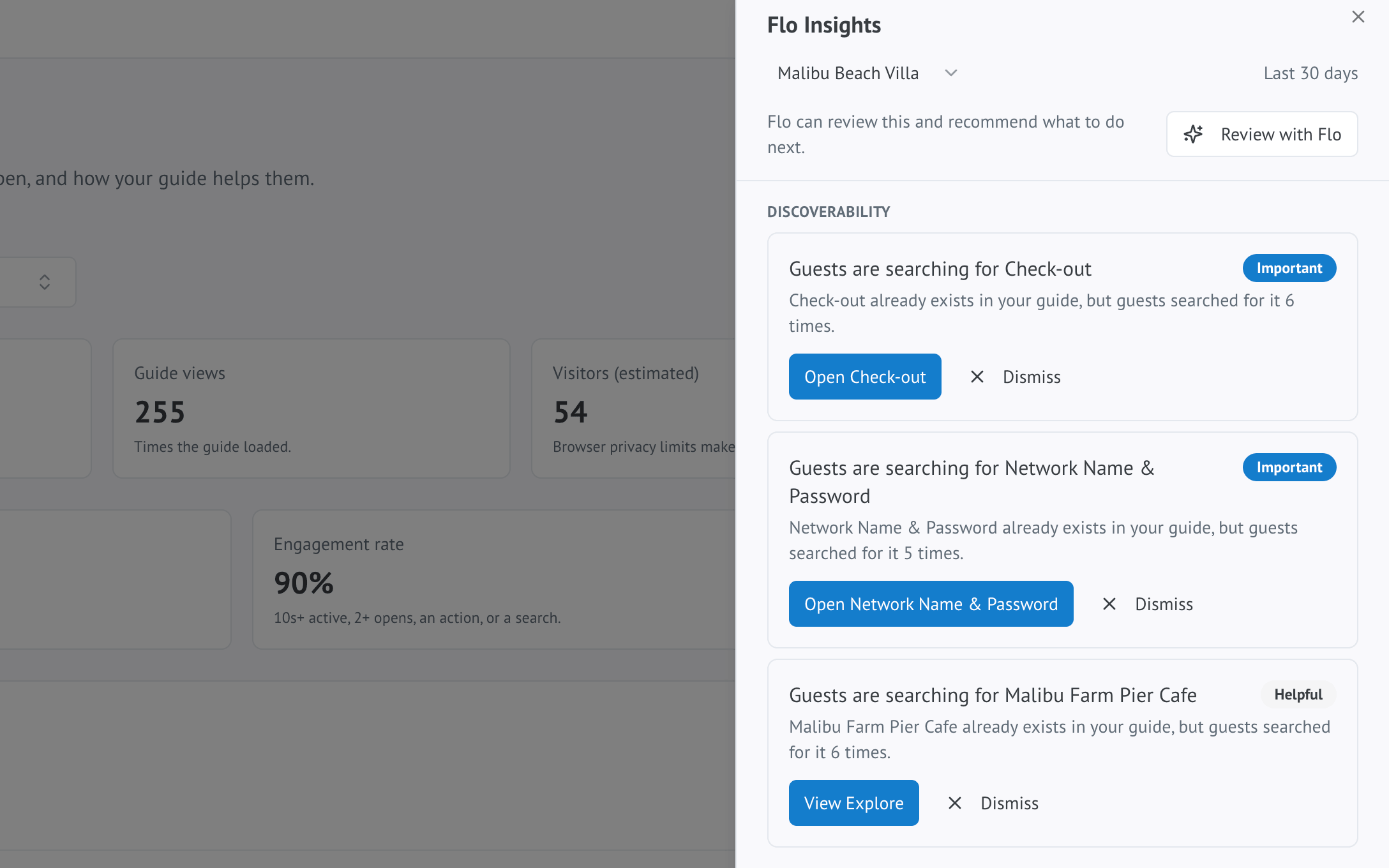
What it looks for
Flo Insights checks your guide's activity for patterns worth acting on, including:
- Searches guests make that never turn up a result
- Searches that do find something, but keep happening anyway — a sign the content is hard to find, not missing
- Content that a lot of guests open and spend real time in
- Explore categories or places that get unusually high attention
- An Extra that guests view often but rarely request
Each one becomes a plain-English suggestion with a recommended next step, rather than a number you have to interpret yourself.
What's different on Free versus Pro and Business
Every plan gets these suggestions in straightforward, rule-based form. Pro and Business additionally get an AI-written explanation for each one and a clearer recommended action, drawing the same underlying signals together.
Reviewing a suggestion
Open a suggestion to see the activity behind it, then either act on it directly — Flo Insights links you straight to the relevant section or Extra — or dismiss it if it does not apply. Dismissed suggestions do not reappear unless the underlying activity changes significantly.
