WelcomeFlo vs Touch Stay: Which Digital Guest Guide Is Right for You?
A detailed WelcomeFlo vs Touch Stay comparison: design and guest experience, AI, shared content, offline/PDF, upsells, integrations and pricing.
 By Daniel Foster10 min read
Both WelcomeFlo and Touch Stay solve the same core problem — a digital guest guide that answers questions before they become messages — but they put their depth in different places. Touch Stay has built outward into operations: PMS connections, its own messaging, an upsell store. WelcomeFlo has put more of its depth into the guide itself: how it feels to hold on a phone, how it looks offline, and how naturally AI sits inside the experience for both host and guest.
The quick verdict
Touch Stay connects to around two dozen property management systems and includes its own automated SMS/email messaging and an upsell store — a real advantage if operational connectivity is what you're choosing on. WelcomeFlo is built around the guide experience itself: an app-style mobile interface, AI on both sides of the guide (writing it and answering from it), and a Free plan that lets you test a real guide before deciding anything else.
At a glance
| WelcomeFlo | Touch Stay | |
|---|---|---|
| Free plan | One complete guide, free forever | 14-day trial, card required, no permanent free tier |
| Mobile guest experience | Persistent app-style bottom navigation (Home, Stay, Explore, Extras, Search) | Progressive Web App, installable to the home screen |
| Shared content across guides | Content Library, per-section visibility | Content Hub + Tags ("All Guides" tag shares everywhere) |
| Guide creation | Template, or import from an Airbnb/Booking.com listing, PDF or DOCX | Template builder, or AI Guidebook Generator from an Airbnb listing link |
| Guest AI Q&A | Ask Flo, built into the Search tab (Pro/Business) | AI Chatbot built into the guide, with sentiment-tagged insights |
| Host writing AI | Flo Assistant: improve, shorten, rewrite tone, fix grammar, turn into steps, expand, write new (Pro/Business) | AI Content Assistant: turns rough notes into full prose in a chosen tone |
| Local recommendations | Explore tab: live Google data, map/list view, category filters, Open now | Google Places-linked recommendations, pinned on a Map tab |
| Translation | Flo Translations: guest-facing, host-curated per guide from 19 supported | Automatic Google Translate, or manually-authored translations in 16+ languages |
| Upsells | Extras: instant, approval, quote and free-request flows, Stripe payouts to the host's account | The Store: categorised products and services |
| Analytics depth | Visits, engagement, content opens, search terms, link clicks, share-source attribution, Ask Flo performance | Chatbot conversation history, sentiment, feedback ratings |
| PMS integrations | Hostaway & Guesty Pro, Pro/Business plans | ~26 PMS integrations including Hostaway, Guesty, Lodgify, OwnerRez, Mews |
| Messaging automation | Built-in automated email (Guest Communications, Pro/Business with a synced PMS), or pairs with your existing scheduled messages | Built-in automated SMS/email (Memo) |
| Offline/PDF | Downloadable branded PDF: cover photo, host logo, QR back to the live guide, contents page, theme colour (Pro+) | PWA offline caching plus a downloadable/printable PDF |
| QR/print signage | Built-in sign generator: pick a design and size, done | Canva templates provided for DIY sign design |
| Entry price | Free (1 guide), Pro $19/mo or $180/yr (25 guides), Business $49/mo or $480/yr (unlimited) | From roughly $99/year for one property; scales with property count |
Design and the guest experience
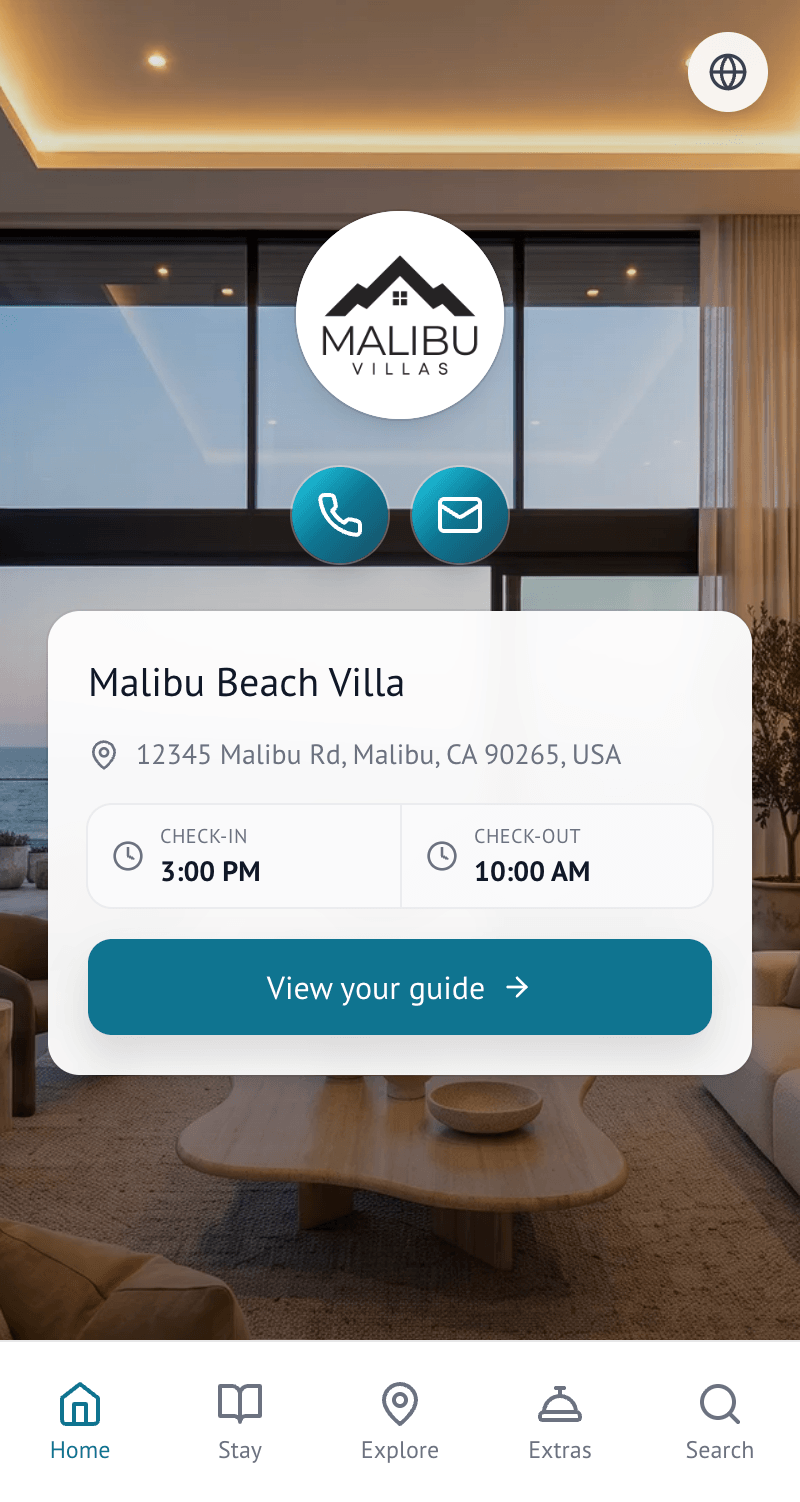
Open a WelcomeFlo guide on a phone and the shape is deliberately familiar: a fixed bottom navigation bar — Home, Stay, Explore and Search always, with a fifth Extras tab appearing only for guides that actually sell something. Tapping into a piece of content opens it in a sheet that slides up over the current screen rather than navigating to a new page, so a guest checking the Wi-Fi from Home never loses their place. It reads like a well-made mobile app rather than a scrolling document, which is the difference between "the guide has a lot of information in it somewhere" and finding the thing you need in five seconds, one-handed, at the door with bags.
The Wi-Fi block shows what that attention buys in practice: network name and password sit in their own card with one-tap copy, and an optional scan-to-connect QR code underneath. Explore does the same for local recommendations — category-pill filters, a live "Open now" toggle, and a map/list view, with every place carrying Google-sourced photos, ratings, hours and directions, since Google is treated as the single source of truth for facts like that rather than something WelcomeFlo guesses at.
Ask Flo lives inside the same Search tab guests already use for ordinary keyword search, rather than behind a separate chat bubble: search normally, or ask a question in your own words, and the answer comes back grounded only in the guide's own content, linking back to the section it drew from.
Touch Stay's guest experience is also considered: it runs as a Progressive Web App a guest can add to their home screen, working offline once cached. Where the two diverge most is the navigation model — Touch Stay organises content into categories and topics within a more traditional guidebook structure, while WelcomeFlo's fixed tab bar and in-context sheets are closer to what a well-designed shopping or banking app does today.
Offline, PDF and printed signage
Both take offline seriously from different directions. Touch Stay's PWA caches the whole guide to a phone in advance, so it's browsable with no connection at all, and it also offers a downloadable, printable PDF.
WelcomeFlo's downloadable PDF (Pro and Business) is a laid-out document rather than a browser printout: full-bleed cover photo, the host's circular logo, property name and location, a contents page, and section pages carrying a running header/footer and the guide's own accent colour — with a QR code on the cover linking back to the live guide, so a printed copy is never a dead end.
For printed signage, Touch Stay provides Canva templates — a head start, but still a DIY layout task. WelcomeFlo's sign generator is built into the dashboard: pick a design and paper size, and a finished PDF sign is generated automatically from the guide's own branding, with Business-plan branding removal.
Guide creation, content and AI
Every WelcomeFlo plan, including Free, can build a first draft for you: import an Airbnb or Booking.com listing, or upload a PDF or DOCX welcome pack, and the content is pre-sorted into the guide's sections to review rather than typing from a blank page. Touch Stay's AI Guidebook Generator does the same from an Airbnb listing link, alongside a template-based builder with a large library of pre-written topics.
For multi-property hosts, Touch Stay's Content Hub and Tags let a topic tagged "All Guides" (or a custom tag) appear and update across every guide sharing that tag. WelcomeFlo's Content Library works section by section, with each section explicitly scoped to specific guides or shared library-wide, inside the same editor as Flo Assistant and Flo Places. Both solve the real problem — writing the same policy five times and having the copies drift — through a different mental model: tag-matching versus per-section visibility.
Both products now ship AI on both sides of the guide. Guest-facing, WelcomeFlo's Ask Flo and Touch Stay's AI Chatbot both answer only from the guide's own content, built into the guide rather than a separate app. Host-facing, Touch Stay's AI Content Assistant turns a host's rough notes into full prose in a chosen tone with one click; Flo Assistant covers more distinct actions in the same editor — improve, shorten, friendlier, more professional, fix grammar, turn into steps, expand, a custom instruction, or write from scratch — useful for editing existing content in a specific direction rather than only generating fresh prose. Where Flo differs most from a single chatbot feature is that it spans the whole guide lifecycle: Flo Importer gets content in, Flo Assistant improves it, Flo Places helps build the local recommendations, Ask Flo helps guests find answers, Flo Translations puts the guide in a guest's own language, and Flo Insights turns guest behaviour into suggested improvements.
Translations and local recommendations
WelcomeFlo's Flo Translations lets guests switch a guide into their own language from a picker inside the guide, drawing from 19 supported languages that the host curates per guide. Touch Stay translates content two ways: an automatic option powered by Google Translate, and a manual option where a host authors precise translations across 16+ named languages. Google Translate's automatic coverage is broader out of the box; Flo Translations is native to the product, so a host doesn't have to hand-author content to get accurate coverage.
For local recommendations, WelcomeFlo's Explore tab and Flo Places tool pull every fact — rating, review count, hours, business status — straight from Google, with AI touching only a host's own free-text notes. Explore adds a live "Open now" filter and a map/list toggle on the guest side. Touch Stay also integrates with Google Places, pulling in hours and contact details automatically and pinning recommendations on a dedicated Map tab.
Extras, analytics and messaging
Extras is built around how hospitality upsells actually work: an early check-in might need approval before it's confirmed, a hamper might charge immediately, a private chef enquiry might need a quote first. Hosts can require approval before payment completes, take an instant charge, or send a quote — all inside the same catalogue, with payments settling directly into the host's own Stripe account. Touch Stay's Store is a categorised products-and-services tab for the same job.
WelcomeFlo's analytics cover guide views, engaged visits and engagement rate, active time, which sections and places guests actually open, search terms (including ones that returned nothing), which links guests follow, and which channel got them into the guide at all — a copied link, printed sign scan, downloaded QR, offline PDF, or email. Flo Insights turns that guest behaviour into a short list of concrete suggested fixes, with an AI explanation layer on Pro/Business. Touch Stay's analytics centre on its AI chatbot specifically — conversation history, thumbs-up/down feedback, and sentiment tagging by guide, date range and message type, a specific signal WelcomeFlo doesn't currently match for Ask Flo.
If a platform that plugs into your existing operations stack is what you need, Touch Stay has the advantage today: roughly two dozen PMS integrations syncing reservations and pushing the guide link into each platform's automated messages, plus its own SMS/email sending, review-request popups and guest contact collection. WelcomeFlo's own PMS reach is narrower — Hostaway and Guesty Pro only, on Pro and Business plans, syncing reservations and delivering each guest a personalised guide link either through the PMS or by email directly — and it has no built-in SMS sending or review-request tooling of Touch Stay's kind; API access also remains on the roadmap rather than shipped.
Pricing
WelcomeFlo: Free — one complete guide, forever, no credit card, including template creation and importing from a listing, PDF or DOCX. Pro — $19/month or $180/year for up to 25 guides, adding the Content Library, Ask Flo, Flo Assistant, Flo Places, Flo Translations, guest and search analytics, and Extras with Stripe payments. Business — $49/month or $480/year for unlimited guides, adding Extras vendor settlement tools and dedicated onboarding.
Touch Stay has no permanent free tier — only a 14-day trial that requires a card — with current published pricing around $99/year for a single property, scaling with property count. For one property the two land in a broadly similar range once the trial ends; the structural difference is that WelcomeFlo's first guide costs nothing indefinitely, and its flat per-tier pricing means a host scaling toward 25 properties pays the same $19/month a one-property Pro host pays, where per-property pricing compounds with every addition.
Which should you choose?
Choose WelcomeFlo if:
- The guide's design and everyday usability — navigation, search, the offline PDF, the printed sign — are what you're judging it on
- You want AI that helps hosts write and helps guests find answers, both included from Pro
- You want a free, permanent first guide with no card required
- You don't need the guide platform to replace your existing PMS or messaging workflow
Choose Touch Stay if:
- You need it to plug directly into an existing PMS from a list of around 26
- Built-in automated SMS/email messaging matters more than a guide alone
- A chatbot analytics dashboard with sentiment tagging is a feature you specifically want
The bottom line
The two products make a genuinely different bet. Touch Stay extends outward into PMS connectivity and messaging automation; WelcomeFlo puts its depth into the guide experience itself — an app-grade interface, a purpose-built offline PDF and sign generator, and Flo tooling that helps on both sides of the guide, all starting from a permanently free first guide. If PMS and messaging automation are your actual bottleneck, that's real and worth weighing. If the guide itself is what you're choosing on, build your first WelcomeFlo guide free and see how it feels on your own phone.
Create your digital welcome book
Build a beautiful mobile guest guide with WelcomeFlo.