Free Airbnb Welcome Book Template for Hosts
A free Airbnb welcome book template ready to copy: seven sections with fill-in sample content, formatting guidance and the fastest way to publish it digitally.
 By Emily Parker7 min read
Searching for a free Airbnb welcome book template usually returns two disappointments: a pretty PDF that's someone else's property with the names blanked out, or a "template" that's really an article about templates. What hosts actually need is simpler and more useful — the proven section structure, sample content for each section that shows the tone and depth, and clear guidance on what to replace. That's this page.
Copy the template below into whatever you build with — a document, a print layout, or (fastest) a free WelcomeFlo digital guide where this exact structure comes pre-built with widgets and photo slots. Every bracketed item gets replaced with your property's truth; everything else is yours to keep, adapt or improve.
Before you fill it in: the three rules
Rule one: replace, never append. Sample text shows shape and register; your details replace it wholesale. A template's voice showing through finished pages is how books end up sounding like everyone else's.
Rule two: photograph as you go. Every [PHOTO] marker below earns its place — arrival steps and appliance entries without images generate exactly the messages the book should prevent. One fifteen-minute walk covers them all.
Rule three: publish at 80%. Brackets you can't fill today get marked and skipped. A live book with two gaps beats a perfect draft in a drawer — and digital books make additions free forever after.
The template
Section 1 — Welcome
Welcome to [Property Name]! We're [names] — [one true line about you: "we live in the village with two noisy spaniels" / "this was my grandmother's house, and her roses still run the garden"]. We're really glad you're here. Everything you need is in this guide; for anything else, message us on [channel] — we usually reply within [honest time]. Make yourselves completely at home.
(Four sentences maximum. Swap the register to match your property — brisk and practical for a city apartment, warmer and slower for a cottage — the structure holds either way.)
Section 2 — Getting here and getting in
Address: [full address, postcode prominent] Directions: [the one thing satnavs get wrong] — look for [landmark]. [PHOTO: street approach] Parking: [exactly which space/street, permit rules, the trap to avoid]. [PHOTO: the space] Getting in:
- [Step one] [PHOTO]
- [Step two] [PHOTO]
- Code: [code] — [the knack: "press firmly, then the tick"] Arriving late? [lighting note + reassurance that late is fine]. Early? Bags can wait [where] from [time]. If anything fights you: [common fix], and call [number] any hour — genuinely.
Section 3 — The essentials
Wi-Fi — Network: [name] / Password: [password] (digital: use the tap-to-copy widget) Check-in from [time] · Checkout by [time] Bins: [colour] for [type], collected [day], they live [where]. [PHOTO] Heating, quick version: [two lines — where the control is, what to press]
Section 4 — How things work
(One block per system; copy the pattern for whichever appliances actually confuse guests at your property — start with the ones you've explained more than once.)
[System name — phrased as the guest's goal, e.g. "Hot water (there's plenty)"] [Where it is]. [How to use it, in doing-order]. [The quirk, named kindly]. [Permission or limit: "use freely" / "already set — no need to touch"]. [PHOTO]
Repeat for: heating & hot water · hob & oven · coffee machine · dishwasher · washing machine · TV & streaming · [your specials: log burner, hot tub, EV charger].
Spares & safety: towels [where] · first-aid kit [where] · fire extinguisher [where] · torch [where] · stopcock [where — PHOTO this one] · fuse box [where].
Section 5 — House rules
The [three/four/five] things we ask:
- [Rule] — [its real reason]
- [Rule] — [its real reason]
- [Rule] — [its real reason] Beyond that: live here properly. [One generous line: "pantry basics, garden herbs and board games are all for using."]
Section 6 — Our local guide
Eat & drink: [Name] — [type, distance, one insider line: "order the special, sit outside"]. (×4–5) Coffee & breakfast: [Name] — [insider line]. (×2) Things to do: [the walk you'd take a friend on] · [the beach/viewpoint] · [the one paid attraction worth it] · [the kids' option] When it rains: [two genuine refuges] Practical: supermarket [which and why] · pharmacy · cash machine · taxi [number that answers]
(Twelve defended entries beat forty names — curation method. Digitally, add each place by name and live photos, hours and directions attach automatically.)
Section 7 — Leaving day
Checkout is [time] — [one-line reason if the turnover is tight]. Just [2–4] things: keys [instruction] · [task] · [task]. Everything else is our job. Luggage after checkout? [option]. It's been a pleasure — safe travels, and [warm closing line].
Formatting guidance that makes the template work
Three presentation decisions carry the finished book. Headings in the guest's words — keep the section names conversational ("Getting in", not "Access information") so scanning works. Bold the retrieval targets — codes, times and network names in bold on their own lines, because stressed eyes hunt for visual anchors. Steps as numbers, facts as short lines, never paragraphs — the template's line-by-line shape is the formatting; resist the urge to smooth it into prose, which is how instructions become unreadable at the kerb. Keep the section order (arrival before rules, rules before local tips) unless your property genuinely demands otherwise — it matches the order guests actually need the information.
Where to build it
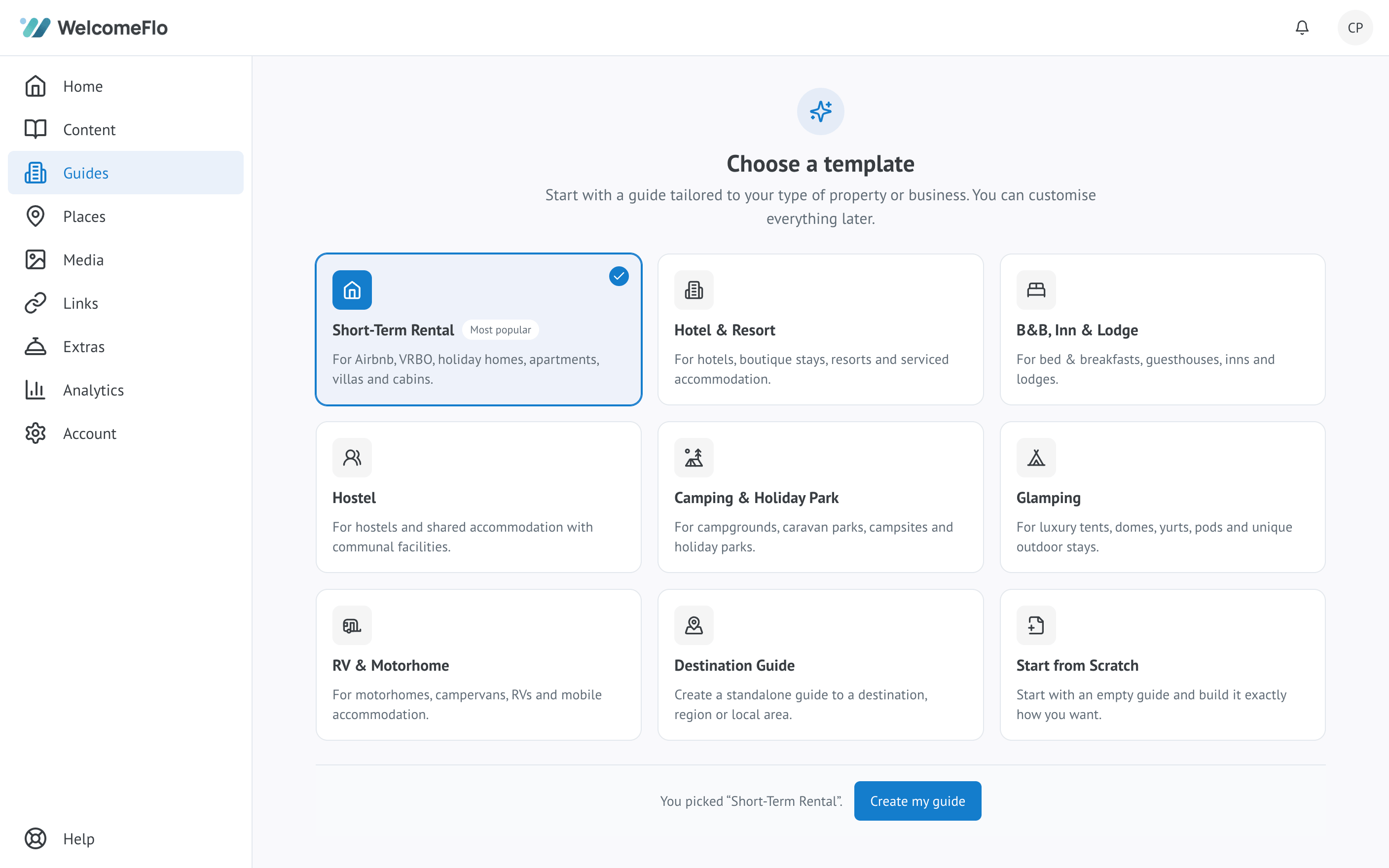
A document (Google Docs/Word) is fine for drafting and printing, but ships without search, widgets or live content, and every future edit means re-exporting. A purpose-built digital guide is the template's best home: WelcomeFlo's free plan opens with these seven sections pre-built, turns the Wi-Fi block into a tap-to-copy widget, attaches live Google data to your local entries via Flo Places, and publishes to a stable link plus printable QR code — with edits shipping instantly forever. If you already have a listing description or a PDF welcome pack, Flo Importer can draft most of this template's sections from it directly, so you're editing rather than typing from a blank page.
After the template: the two habits
A filled template is day one; two habits keep it excellent. Promote every question — anything a guest asks that the book should have answered becomes content the same evening, permanently retiring that question. Edit same-day — when reality changes (new appliance, moved lockbox, closed café), the book changes before the next guest meets the mismatch; the maintenance system makes both habits nearly automatic.
Adapting the template by property type
The core seven fit every rental; the flavour comes from weighting. City apartments expand Section 2 heavily — building doors, buzzers, lifts and the parking reality deserve extra steps and photos, while the local guide leans walkable. Rural cottages expand Section 4 — heating with personality, water quirks, signal honesty — and Section 6 gains driving distances and the "stock up before arrival" note. Beach and pool properties add equipment protocols and clear supervision wording as Section 5b, plus sand-management etiquette. Family listings add a kids' block to Section 4 (cot, highchair, stair gate locations) and a with-kids category to Section 6. Pet-friendly properties add their pet policy — where pets are and aren't allowed, and the clean-up expectation — as another 5b.
The adaptation method is always the same: keep the skeleton, expand where your guests' questions concentrate, and let your last month's inbox tell you where that is.
The bottom line
Seven sections, sample content, three rules: replace the brackets, photograph the markers, publish at 80%. That's a welcome book most listings never reach, built in an evening. Fastest route: open the pre-built version free and start pasting — the template's already waiting inside.
Create your digital welcome book
Build a beautiful mobile guest guide with WelcomeFlo.